What Is the AI Mecha Transformation Video Trend? (2026 Explainer)
 AI Mecha Transformation Team
The AI mecha transformation video trend in one page: where the fruit-touch format came from, why one photo is enough, what the clips actually look like, and how to tell a real transformation from a slideshow with armour stickers.
What Is the AI Mecha Transformation Video Trend? (2026 Explainer)
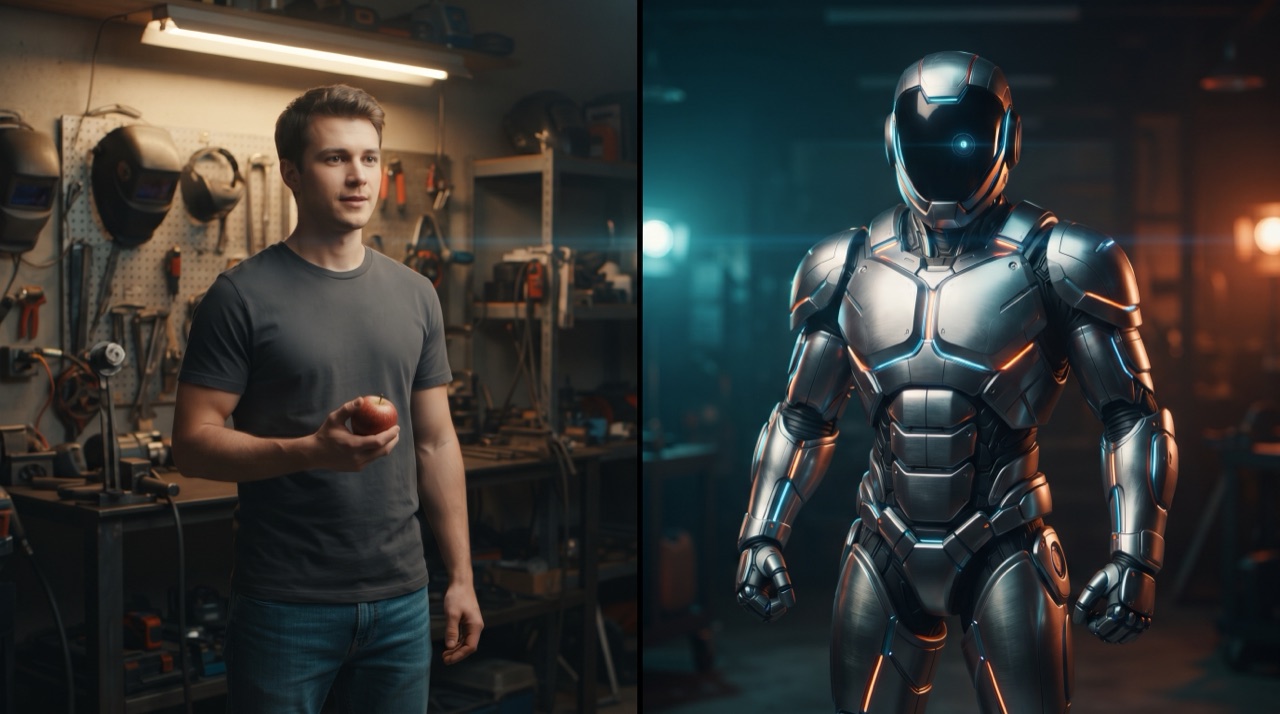
Ask someone what an AI mecha transformation video is and you usually get one of two answers: "people turning into robots" or "the carrot thing". Both are right. The format that took over short-form feeds is short, vertical and almost insultingly simple — a person holds an everyday object, touches it, and mechanical armour assembles over their body in a single continuous shot. Carrot, bike handlebar, phone, a can of drink, whatever is within reach. The transformation is the punchline, and it lands in under fifteen seconds.
This page is the explainer: what the trend actually is, where the "AI mecha transformation video" label comes from, why a single photo is enough to drive it, and how to tell a genuine image-to-video render from a photo slideshow with a metal filter dropped on top. If you would rather skip the theory and make one, the studio on the front page does the whole job in four clicks and the step-by-step walkthrough covers the details.
The format, stripped to its parts
Every clip in this trend is built from the same four ingredients:
- One reference photo. Almost always a person, sometimes a pet, a car or a bike. Front-facing, whole subject in frame, decent light.
- One trigger. An object the subject touches, lifts or grips — the carrot is simply the most photographed one. The trigger is the reason the armour appears; it gives the model a beat to cut on.
- One assembly. Armour plates fold out and close, in a readable order: forearm, shoulder, chest, then the helmet or visor. The good clips show the mechanism, not just the result.
- One continuous shot, vertical. No cuts, no camera gymnastics, 9:16 because the whole point is a phone screen.
Take any of those four away and the clip stops working. That is the entire trend. The reason it looks complicated is that the middle part — the assembly — is the part a short-video editor cannot fake convincingly, which is why it only became a mass format once image-to-video models got good at maintaining identity across a body that is changing shape.
Where the label came from
"AI mecha transformation video" is a search phrase, not a genre. It describes the output rather than the tool: an AI-generated clip in which a subject transforms into a mechanical armoured version of itself. The phrase spread because the format was born on short-form feeds, and the platforms reward consistent naming — once ten thousand people call it a mecha transformation, that is what it is called.
Two things distinguish it from the older "turn yourself into a superhero" style edits:
- It is generated, not composited. There is no plate of armour being tracked onto a filmed body. The model decodes new frames in which the subject and the armour share the same lighting, the same lens and the same camera move.
- The subject stays recognisable. Face, hair, skin tone and build survive the transformation. Old filter-based edits replaced you with a cartoon; this keeps you and adds structure around you.
That second point is the technical heart of the trend, and it is also where most failed clips go wrong — see the piece on why the suit starts looking like Iron Man for the most common failure mode.
Why one photo is enough
Image-conditioned video models take a still as the first frame or as a subject reference. The still does two jobs at once: it fixes identity, and it fixes the starting geometry the model has to animate.
- Identity anchoring pins the face, hair colour, skin tone and build to the subject, so the armour can change while the person does not.
- Geometry grounding gives the model a body to fold plates onto. A photo of someone standing with their arms visible offers more usable geometry than a photo cropped at the shoulders, which is why the tight portrait that works for a headshot is often the worst input here.
The practical consequence is blunt: the photo is the specification. A clear, well-lit, full-torso photo of one person produces a stable render. A blurry group photo taken in a dark bar produces drift, a changed face and plates that attach to the wrong shoulder. The format guide for vertical output covers framing in more detail.
What a real render looks like
A clean clip has a visible order of assembly. Watch one twice and you can list what happened: the plates on the forearm locked first, the chest plate rose and seated, the pauldrons dropped, the visor closed last. The metal reflects the room the person is standing in, and the sound — hydraulics, servo whine, a heavy metallic clack — lines up with what the picture is doing.
Here is a real render made with one of the studio presets, from a single uploaded photo.
This clip: 30 credits · 6 clips a month for $39.90 (Pro), or 80 a year for $319
Symptoms of a fake or recycled asset, in case you are being sold one:
- Nothing moves except a wipe. The armour appears over a still photo with a gradient sweep. Watch the hands: in a real render the hands keep moving while the plates close over them.
- The environment is a stock plate. The background is unrelated to the person's lighting direction, or the person is cut out with a visible edge.
- The face changes. The person at second zero and the person at second twelve are not the same human — a different nose, different hair. That is a model that lost its anchor, or a video stitched from several unrelated generations.
- The list is missing. Real renders show the mechanism: hinges, seams, plates sliding, sparks, the visor seating. A two-second crossfade is not a transformation.
What it costs and how the credits work
This site runs one model on one tier: Seedance 2.0, the standard tier. Prices are not dynamic and nothing is charged after you press Generate.
| Output | Length | Credits | | ----------------------------------------- | ------ | ------- | | 480p | 12s | 5 | | 720p (Standard — the figure on the cards) | 12s | 10 | | 1080p (the studio's default delivery) | 12s | 30 |
Longer clips scale linearly from the 12-second rate and round up to the next whole credit. A Google sign-in grants 30 credits once, which is exactly one default 1080p render. Email sign-up grants nothing immediately; the balance builds from daily check-ins (10, 20, 30, then 10 for each of the next four days, one check-in per 24 hours). Failed renders are refunded to the balance they came from. Full tiers and one-time packs are on the pricing page.
Making your first one
- Choose your photo. One person, front-facing, full torso, even light, uncluttered background.
- Choose your trigger. Pick an object that is actually in the frame or that you can hold up. The carrot works because it is small, bright and instantly readable at thumbnail size.
- Start from a preset. The carrot touch, the bike suit-up, the armour from a phone screen or the giant robot rise — each one is a complete prompt with the camera, the lighting and the assembly order already written.
- Render at 480p first. Five credits buys you a check that the face is holding before you spend thirty on the 1080p version.
- Download and post. No watermark, private to your account, 9:16 MP4.
FAQ
Is this the same as the "fruit touch" trend? Yes. The fruit touch is the most popular trigger for a mecha transformation video, not a separate format. Carrot, lemon, apple, tomato — the object only matters because it gives the assembly a reason to start.
Do I need a person in the photo? No. Pets, cars and bikes all transform with the same presets, as long as the whole subject is in frame. The person-shaped version is just the version the trend is famous for.
Do I need to write a prompt? No. Pick a preset and it is written for you. If you want your own version, the prompt guide lists the sentences that actually change the output.
How long does a clip take to render? The clip itself is twelve seconds long. Rendering runs remotely and takes a couple of minutes for a standard clip, longer at 1080p. The studio polls the real job status, so what you see is the real state of the job.
Is it free? You get 30 credits from a Google sign-in — one default render — and credits from check-ins if you sign up by email. After that, plans and one-time packs start at a single video.
Can I sell or post the result? The file is yours, with no watermark and no publishing step in between. Read the terms for the formal wording instead of taking a summary here as legal advice.
What if my render fails? Credits return to the balance they came from, and retrying the same prompt does not double-charge. Persistent failures are almost always a prompt asking for two or three actions at once — the troubleshooting guide walks through the fixes in order.
Ready to see one? Upload a photo on the front page and render a 480p test before you spend anything on the delivery version.